

Azure DevOps in 2026: Beyond the Pipeline
As we move through 2026, the conversation around Azure DevOps has shifted. It’s no longer just about “getting code to production”—it’s about Platform Engineering and Governance at Scale. While many predicted the total migration to GitHub, Azure DevOps has carved out a permanent, powerhouse niche for enterprises requiring complex release orchestration and tight Microsoft ecosystem integration.
1. The Convergence: Azure DevOps + GitHub Advanced Security (GHAS)
One of the most significant updates this year is the full maturation of GitHub Advanced Security for Azure DevOps. Organizations no longer have to choose between the best security tools and their preferred orchestration platform.
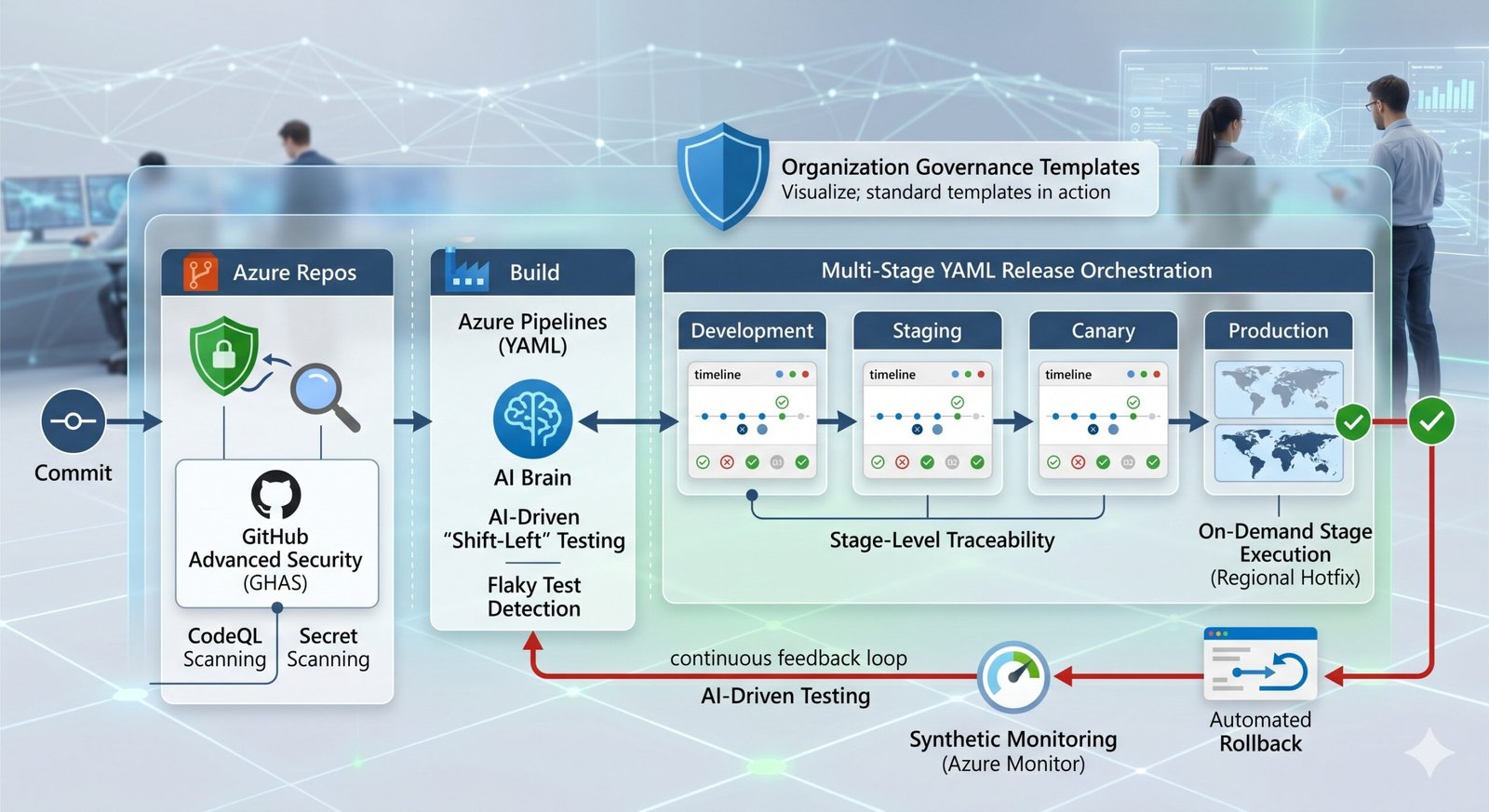
- Native CodeQL Scanning: You can now enable secret scanning and dependency alerts directly within Azure Repos with a single click.
- Push Protection: The “Agent Gateway” now blocks secrets from ever entering your repository, providing an audit trail that meets 2026 compliance standards (like HIPAA and SOC2).
2. Multi-Stage YAML: The Death of Classic Releases
If you are still using the “Classic” UI-based release editor, 2026 is the year to officially migrate. The parity between YAML pipelines and Classic releases is now complete, offering features that were once “UI-only”:
- Stage-Level Traceability: New dashboards provide a bird’s-eye view of which commit is in which environment across hundreds of pipelines.
- On-Demand Stage Execution: You can now trigger specific stages (like a manual hotfix to a specific region) out of order without re-running the entire pipeline.
- Deployment History for Stages: A dedicated “Timeline View” for environments allows teams to see every deployment, approval, and gate failure in a unified audit log.
3. AI-Driven “Shift-Left” Testing
Testing in 2026 isn’t just automated; it’s Intelligent. With the recent integration of Playwright support directly into Azure Test Plans, the feedback loop has reached sub-minute speeds.
- Flaky Test Detection: Azure Pipelines now uses AI to identify “flaky” tests—those that fail inconsistently—and automatically quarantines them while notifying the developer.
- Synthetic Monitoring Integration: By linking Azure Monitor directly to your pipeline, the system can automatically roll back a deployment if it detects a 5% spike in latency or error rates post-release.
4. Best Practices for 2026
To stay ahead, enterprise DevOps teams are adopting these three core principles:
- Workload Identity Federation: Stop managing secrets. Use secretless authentication (OIDC) for your pipelines to communicate with Azure, AWS, and GCP.
- Pipeline Templates for Governance: Don’t let every team write their own YAML. Use centralized “Extends” templates to enforce security scans and approval gates globally.
- FinOps for Pipelines: With the rise of larger, GPU-enabled hosted agents, monitoring “Pipeline Spend” is now a key part of the DevOps role. Use the new Azure DevOps Billing dashboards to optimize your build costs.
Conclusion: The Enterprise Choice
Azure DevOps remains the “Pro” tool for organizations with complex portfolio management needs. By blending the developer-first speed of GitHub security with the industrial-grade project management of Azure Boards, Microsoft has created a hybrid environment that is truly hard to beat.
Ready to modernize your YAML templates? Reach out to our Platform Engineering team for a 2026 readiness audit.
Our greatest weakness lies in giving up. The most certain way to succeed is always to try just one more time. emotional sensation of stress from our first.